Visitor Management
← Projects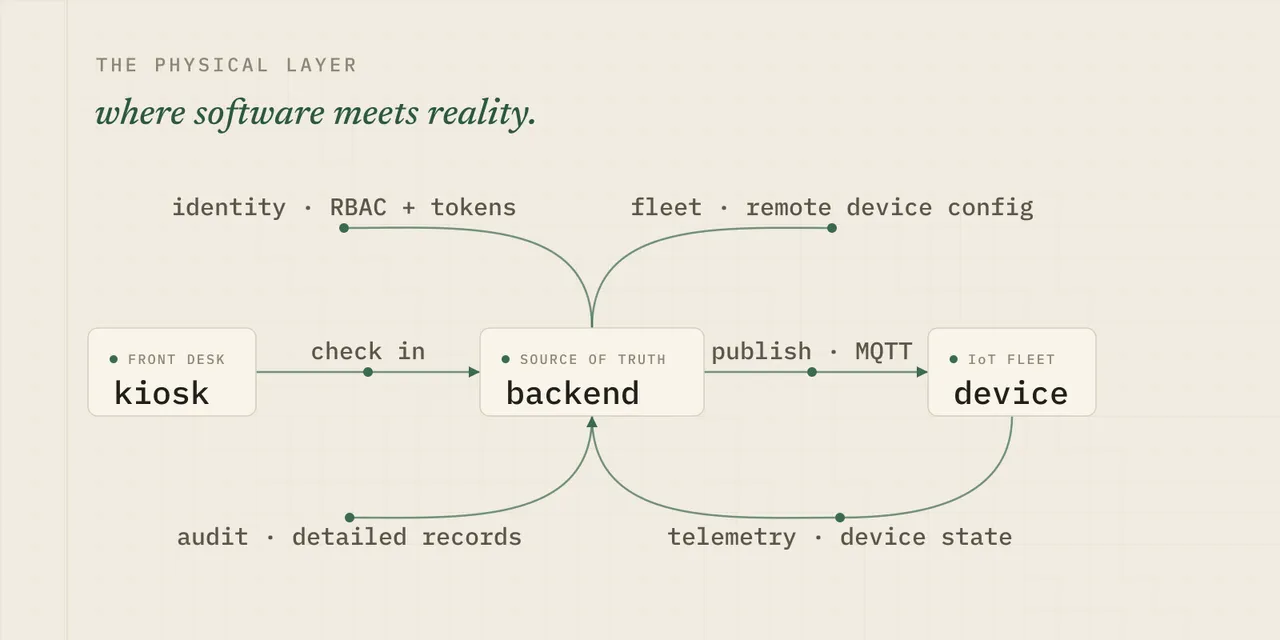
A production visitor-management platform that runs a physical workflow, not just a database. A visitor checks in at a front desk, the backend picks a smart badge and drives it over IoT, and the system tracks that visit through to checkout, across sites, devices, and the operations teams who have to explain it when something goes sideways. This is a work-in-progress writeup of what I’m building and, just as much, what I’m hardening.
The problem (why this isn’t just a CRM)
Coming from the world of agency CRMs and fully digital workflows, this project posed some unique challenges. Instead of having pure push source-of-truth capacity in the central application, there is a need to consider external datapoints to maintain reliability and ensure accurate records keeping.
As a system begins to interact with the real world, the multiplicity of edge cases and unique constraints explodes, requiring planning, testing, and sometimes rapid iteration when discovered in the wild.
How do you handle a device that stops reporting? How do you handle it when it comes back online? What if a device has a power or hardware issue that makes it drop communication, preventing command acknowledgment, telemetry, or remote state recovery? What internal logs and auditing can you store to enable rapid and accurate debugging?
These complex cases are what take the project from a basic multi-tenant CRM with RBAC to a truly challenging and interesting project that not only can keep, but demands full attention and focus.
The systems at a basic level
Visitor lifecycle
The core of the entire application, visitors pose their own unique challenges. The basic flow is deceptively simple:
- (optional) Visitors can be created/imported to preload data and face data for seamless checkin
- Visitor arrives at the location, and checks in at a kiosk creating a visit
- The system identifies the best badge, and locks it for checkin
- Once the badge acknowledges checkin, visit status is updated and the checkin worker is completed
- When the badge is provided to the visitor, telemetry begins being processed for location solves
- When the badge is returned, the checkout worker completes the visit
- End state, the visitor is checked out and the badge is released back into the available pool
Device control
Utilizing MQTT channels and mTLS, communication with devices is scalable and secure - usually. The challenges always arise in the shadows and where reality interacts with theory. Some of the critical elements needed for a robust system include connection recovery on both sides, requiring responses for commands, no-ack handling on commands (choose another device or retry?), status and telemetry monitoring to predict device failure, and remote configurability.
Fleet operations
Administration
The main lift around fleet operations for the API/application layer was handling assignments and state monitoring. Instead of spinning up a custom RabbitMQ or Mosquitto instance and managing it ourselves, the device team desired a solution they could interact with without pulling the application team too much into the loop on, distracting from other work. The solution decided on was to use AWS IoT Core, making secure IoT provisioning and communication much simpler for all involved.
Maintenance and configuration
With any distributed system, the question is not if you will have to make changes, but when and how severe they will be. Working with the device team, tooling to allow secure configuration and firmware changes were a critical step in improving supportability of the fleet across locations.
This allowed us to rapidly iterate, adjusting location-specific connectivity settings, update firmware to mitigate issues, and provide detailed reporting of device state and behavior. An expensive multi-day trip to a customer location became a series of tests and secure push, and a round of configuration adjustments.
Security and Access
Humans and machines
The system operates on a standard auth-gated RBAC structure, with different role and membership checks depending on information or actions being used. For example, a global admin can help setup organization settings and configurations, but cannot view sensitive visitor information without an explicit organization scoped role that is applicable.
Within this system, there are workflows that external services need to be able to perform. The solution, least-privilege low weight service tokens with explicit action grants, stored in AWS Secrets Manager for secure access by other AWS services on a per-secret basis, and rotated regularly.
Kiosks - the face of the application
Kiosks are the only directly public-facing point of the system, and as such deserved some focused planning. The solution was to allow users to start sessions with their normal logins, granting a dedicated session token. These credentials:
- Only operate on that device
- Can be monitored remotely
- Emit audit logs on main actions
- Can be remotely revoked
- Cannot perform any actions not scoped to the kiosk workflow
- Are stored securely locally, allowing persistence
- Cannot be used to modify the setup/session settings
- Can require a one time activation code to initialize
Visitors and their doppelgangers
The preferred visitor identification flow is via facial recognition, on positive match their data is retrieved and shown on a confirmation screen for final human-in-loop confirmation. If no match is found, we also allow manual entry of details. On the backend, due to a variety of reasons (repeated import, bad lighting of image, typo, etc) it is critical to have a strategy in place to efficiently but also accurately handle duplicate visitors.
You might think “Duplicate visitors? What a beginner mistake! Just force uniqueness on emails and call it a day!” - and to be honest I had the same thought at first. But on headlong collision with the reality of the deployed workflow and constraints like never blocking a visitor on kiosk checkin, it became clear that a more robust system was going to be necessary.
My strategy to solve this is a two layered approach, using an auto re-use/merge rubric for visitors we are very confident are the same, and a secondary merge candidate workflow for visitors we were not able to determine with sufficient certainty to make a merge. This allows admins to have control and visibility on existing potential duplicates in the system and take appropriate actions.
Future: We are in discussions to use AI or other solutions to scan visitor lists for potential duplicates or outliers after creation, the current implementation only fires when a visitor is either required, or a create is attempted. The rubric and scope is thus relatively limited and rigid currently.
Records and diagnostics
As occasionally mentioned above, one of the best gifts you can give yourself and future maintainers of a system (usually yourself anyways) is to provide detailed and consistent logs - both system and also internal. Audit logs aren’t just a compliance tool or to check a box, but one of the primary avenues you have to trace and debug incidents as and after they occur in the wild.
In light of this, we have implemented a multi-layered logging policy, scoped to the applicable domains. For example, system relevant logs on tasks themselves, audit logs internal to the system, and monitoring for operational health and usage statistics.
This approach gives us enough information to track why the system took a specific action, and to help pinpoint the exact cause of an incident even after the fact - including causes outside of the system itself.
The engineering challenges
Things always work on the bench, and the lab always gives you a false sense of confidence. Once things are in the wild, that is where your decisions, both good and bad, come to light in painful detail. Whether that is low WiFi strength on devices causing poor connectivity, hardware issues causing intermittent device failures, or users interacting with the system in a way you had not anticipated, you will be rapidly humbled and presented with a very long and growing list.
But maybe these setbacks can be another opportunity to learn and to excel.
Device state and communications
Tracking quality, and over optimizing
Sometimes, trying to optimize a bad situation can simply make it worse. We had a situation where badges were giving very poor telemetry, minimal WiFi connectivity and very erratic tracking solves. After tuning, and adjusting, and working with the tracking algorithm, we determined that the primary issue was simply that the badges were not getting enough AP signals over the threshold, sometimes reporting one or even zero visible APs.
The algorithm was never the issue, we were just feeding it garbage. An issue we hadn’t had in the lab, but was very evident now. After adjusting the minimum strength, behavior markedly improved.
The visiting ghost
If a visitor has a badge that enters an unexpected state while checked in, the system intentionally maintains the visit as we cannot assume that they have left the premises or returned the badge yet. However, what if a badge fails in use, and cannot push that visit termination message? What if it is dead enough that a pushed checkout command cannot ack properly?
We had a case of a bad set of badges occasionally failing, sometimes while in an active visit, causing exactly this edge case. In the normal manual checkout flow, the system awaits the badge ack to confirm it checked out and was reset, before updating the visit from checking out to checked out. This case exposed the need for a manual override per visit in cases where checkout got stuck, or that visitor would not be allowed to visit again in the future due to the one-active-visit constraint.
Data, and actually being able to use it
Filters and cursor based pagination
In the MVP, we had basic walk based pagination that was slow and inefficient - workable on dev data loads, but clunky and not the right tool for proper enterprise scale datasets. One of the first things I changed as we prepared for rollout was to implement a proper cursor and filters based engine for our endpoints, allowing for granular search, sort, and also crucially, sharing of views via URLs.
This enabled faster and more deterministic workflows, and to share exact URLs so collaborators can view the same data quickly and efficiently. Basic stuff for a proper CRM, but even the basics need to be built.
Metrics engine
Ah metrics, everybody loves a good dashboard. But the data underneath can get ugly fast.
What metrics should you offer, to who, and how? Do you need historical data or only realtime? Should those endpoints be the same or unique?
We ended up landing on a a focused set of data endpoints
- Basic real-time state and status
- Time-series state and status
- Realtime position and trace (paginated/cursor)
- Historical complete location trace (server decimated)
Expandable endpoints to hydrate values
Not every call to an endpoint needs every value fully resolved - but being able to fully hydrate the response in one call is a major boon for performance and simplicity.
In this light, I introduced expand-based hydration for key endpoints, allowing for lightweight responses where not needed, but providing fully featured data for calls that require it. For example, user resolution does not always need a full photo hydration, but it should definitely be available.
What I am working on
Can’t say too much, but supporting and maintaining the system, iterative improvements, and feature delivery.
More from the archive